Product Requirements & Technical Overview
1. Document Control
| Product | Weblo TTS - TikTok Shop for WooCommerce |
|---|---|
| Publisher | TIME4IT Sp. z o.o. (Weblo brand) |
| Plugin version | 1.18.16 |
| API platform | https://tts.weblo.pl/ |
| Document type | PRD / Product Requirements Document + Technical Overview |
| Audience | TikTok Shop Partner Center - application verification |
2. Executive Summary
Weblo TTS is a managed connector that links WooCommerce stores to TikTok Shop. Merchants install a WordPress plugin and manage catalog, orders, and after-sales workflows from the WooCommerce admin. OAuth, TikTok Shop API tokens, webhooks, and scheduled synchronisation run on the Weblo cloud platform (tts.weblo.pl).
This design ensures TikTok credentials and OAuth secrets are never stored in WordPress. The plugin communicates with Weblo API using a per-store key pair (store_id + Bearer api_key).
3. Product Goals
- Publish WooCommerce catalog to TikTok Shop with category and attribute mapping aligned to marketplace rules.
- Import TikTok orders into WooCommerce with buyer, line-item, tax, and shipping data.
- Bi-directional inventory synchronisation on stock changes in WooCommerce or TikTok.
- Order fulfillment - push tracking numbers and carriers back to TikTok.
- After-sales: returns, cancellations, address changes, and buyer messaging.
- Settlement and payout visibility inside the admin panel.
4. System Architecture
┌─────────────────────┐     HTTPS REST      ┌──────────────────────┐     TikTok Shop API     ┌─────────────────┐
│  WooCommerce Store  │ ◄──────────────────► │  Weblo API Platform  │ ◄──────────────────────► │  TikTok Shop    │
│  (WordPress + WC)   │   Bearer api_key     │  tts.weblo.pl        │   OAuth 2.0 / PKCE      │  (Seller Center)│
│                     │                      │                      │   Access & refresh tok. │
│  Weblo TTS Plugin   │ ◄── HMAC webhook ─── │  Webhook relay       │ ◄──── TikTok webhooks ──│                 │
└─────────────────────┘   POST /webhook      └──────────────────────┘                         └─────────────────┘
| Component | Role | Technology |
|---|---|---|
| WooCommerce store | Source of truth for catalog, orders, inventory | WordPress 6+, WooCommerce 7+, PHP 7.4+ |
| Weblo TTS plugin | Admin UI, sync triggers, webhook endpoint | PHP, WP REST API, WooCommerce hooks |
| Weblo API | OAuth, TikTok API proxy, sync queue, webhooks | HTTPS JSON API (/api/v1) |
| TikTok Shop API | Official marketplace APIs (products, orders, logistics, finance) | Partner API, OAuth 2.0 |
5. Security Model
- OAuth 2.0 with PKCE - seller authorisation via TikTok; redirect URI:
https://tts.weblo.pl/oauth/callback. - TikTok tokens stored and refreshed only on Weblo - not in the WordPress database.
- Plugin → Weblo auth -
Authorization: Bearer <api_key>header bound tostore_id. - Webhooks - HMAC-SHA256 signature in
X-Weblo-TTS-Signature; store endpoint:/wp-json/weblo-tts/v1/webhook. - Encryption - TLS 1.2+ for all traffic; optional sync logs in uploads directory (not web-accessible).
- Environment separation - production, staging, and development logically isolated.
6. Onboarding Flow (OAuth)
- Install and activate the Weblo TTS plugin in WordPress/WooCommerce.
- Register the store:
POST /api/v1/stores/register→ receivestore_id,api_key,webhook_secret. - Admin clicks “Connect TikTok Shop” → redirect to
https://tts.weblo.pl/oauth/authorize?store_id=…. - Weblo initiates TikTok OAuth (PKCE); seller signs in to TikTok Seller Center and accepts scopes.
- TikTok returns an authorisation code to Weblo callback; Weblo exchanges it for tokens and links store ↔ TikTok Shop.
- Weblo registers TikTok webhooks and relays events to the store’s WordPress endpoint.
- Weblo TTS panel shows “Connected” status with TikTok shop ID, region, and webhook URL.
7. Functional Requirements
7.1 Product catalog
- Push Woo products → TikTok (
POST /sync/products/push) with title, description, price, images, variants, SKU. - Pull TikTok statuses and IDs (
POST /sync/products/pull). - Category mapping WooCommerce → TikTok; mandatory attributes per category.
- Activate/deactivate listings (
/sync/products/activate,/deactivate). - Update existing products (
/sync/products/update). - EU compliance fields (manufacturer, responsible person).
7.2 Inventory
- Sync on WooCommerce stock change (
woocommerce_product_set_stockhook). - Batch push (
POST /sync/inventory/sync) with SKU / variant mapping. tiktok.productwebhook for TikTok-side changes.
7.3 Orders
- Pull TikTok orders (
POST /sync/orders/pull) - manually or viatiktok.orderwebhook. - Import into WooCommerce (
/sync/orders/import,/confirm-import) with TikTok metadata (order ID, package ID). - Woo order metabox with TikTok link, sync status, and fulfillment actions.
- Fulfillment (
POST /sync/orders/fulfill) - tracking number + mapped carrier. - Shipping label download (
/sync/fulfillment/shipping-document).
7.4 Returns and cancellations
- Search returns/cancellations (
/sync/orders/returns/search,/cancellations/search). - Approve/reject with rejection reasons (
/reject-reasons). - Webhooks:
tiktok.return,tiktok.cancellation,tiktok.address,tiktok.package.
7.5 Mapping and automation
- Map Woo ↔ TikTok order statuses, shipping carriers, and order fields.
- Automation rules: stock/price sync on WooCommerce events.
7.6 Finance
- View statements, payments, and unsettled transactions (
/sync/finance/*).
7.7 Buyer messaging
tiktok.messagewebhook; send replies (POST /sync/messages/send).
8. Webhooks (TikTok → Weblo → WordPress)
| Event type | Description | WordPress action |
|---|---|---|
tiktok.order | New or updated order | Import or update WooCommerce order |
tiktok.product | Product/listing change | Update product sync metadata |
tiktok.return | Return request | Returns panel, admin notification |
tiktok.cancellation | Cancellation | Cancellation handling in admin |
tiktok.address | Address change | Update shipping details |
tiktok.package | Package status | Fulfillment status sync |
tiktok.message | Buyer message | Order note / notification |
tiktok.auth | Auth alert | Notify admin to re-authorise OAuth |
Every request is verified with hash_hmac('sha256', body, webhook_secret) before processing.
9. Weblo API (plugin ↔ platform)
Base URL: https://tts.weblo.pl/api/v1. Main endpoint groups used by plugin v1.18.16:
| Group | Endpoints |
|---|---|
| Store | /stores/register, /stores/status, /stores/settings, /stores/disconnect |
| Products | /sync/products/push|pull|update|activate|deactivate, /sync/products/categories |
| Inventory | /sync/inventory/sync |
| Orders | /sync/orders/pull|import|confirm-import|fulfill|cancel |
| After-sales | /sync/orders/returns/*, /sync/orders/cancellations/*, /sync/orders/reject-reasons |
| Logistics | /sync/logistics/shipping-providers, /sync/logistics/warehouses |
| Fulfillment | /sync/fulfillment/shipping-document |
| Finance | /sync/finance/statements|payments|unsettled |
| Messages | /sync/messages/send |
| Mappings | /mappings (GET/POST/DELETE) |
| Compliance | /sync/compliance/responsible-persons, /sync/compliance/manufacturers |
10. WordPress Plugin Modules
| Module | Responsibility |
|---|---|
Weblo_TTS_Api_Client | HTTP communication with Weblo API |
Weblo_TTS_Webhook | REST webhook endpoint, HMAC verification |
Weblo_TTS_Product_Sync | Product push/pull, compliance |
Weblo_TTS_Order_Sync | Order import, fulfillment |
Weblo_TTS_Aftersale_Sync | Returns, cancellations, messages |
Weblo_TTS_Cron | Fallback pull when webhooks fail |
Weblo_TTS_Category_Map / Shipping_Map | Category and carrier mappings |
Weblo_TTS_Admin | Admin panel: dashboard, products, orders, settings |
Weblo_TTS_Sync_Logger | Sync operation audit (optional file logging) |
11. Data - Local vs Cloud
| Data | WordPress (store) | Weblo (cloud) |
|---|---|---|
| Woo products and orders | Yes - full data | Sync metadata, context cache |
| TikTok OAuth / refresh tokens | No | Yes - encrypted, least-privilege |
| store_id, api_key, webhook_secret | Yes - wp_options | Yes - store registry |
| Category/carrier mappings | Yes - local options + API sync | Yes - central copy |
| Sync operation logs | Optional (uploads) | Yes - central API logs |
12. Non-Functional Requirements
- WordPress 6.0+, WooCommerce 7.0+, PHP 7.4+.
- HTTPS required on the store (webhook + OAuth redirect).
- API timeout: 45 s; cron retry on transient failures.
- HPOS (Custom Order Tables) compatibility declared.
- Multilingual plugin UI (PL default, EN via locale).
13. Test Environment
| Demo store URL | https://sklep.packpay.pl/ |
|---|---|
| Marketing / docs | https://tts.weblo.pl/ · Documents (EN) |
| OAuth redirect | https://tts.weblo.pl/oauth/callback |
| Webhook (demo) | https://sklep.packpay.pl/wp-json/weblo-tts/v1/webhook |
Detailed testing instructions and demo credentials are provided in the Partner Center verification form.
14. Related Compliance Documentation
15. User Guide - Application Screenshots
The screenshots below are taken from the demo store sklep.packpay.pl (WordPress + WooCommerce + Weblo TTS v1.18.16). They illustrate the typical merchant workflow - from first login through TikTok order fulfillment in WooCommerce.
- Dashboard - verify OAuth connection status and complete setup steps.
- Products - pair the Woo catalog with TikTok Shop and push listings.
- Mapping - configure categories, carriers, and TikTok-required attributes.
- Automation - enable inventory sync and order import rules.
- Orders - pull and monitor orders from TikTok.
- Order metabox - fulfill shipments (tracking) directly from the Woo order edit screen.
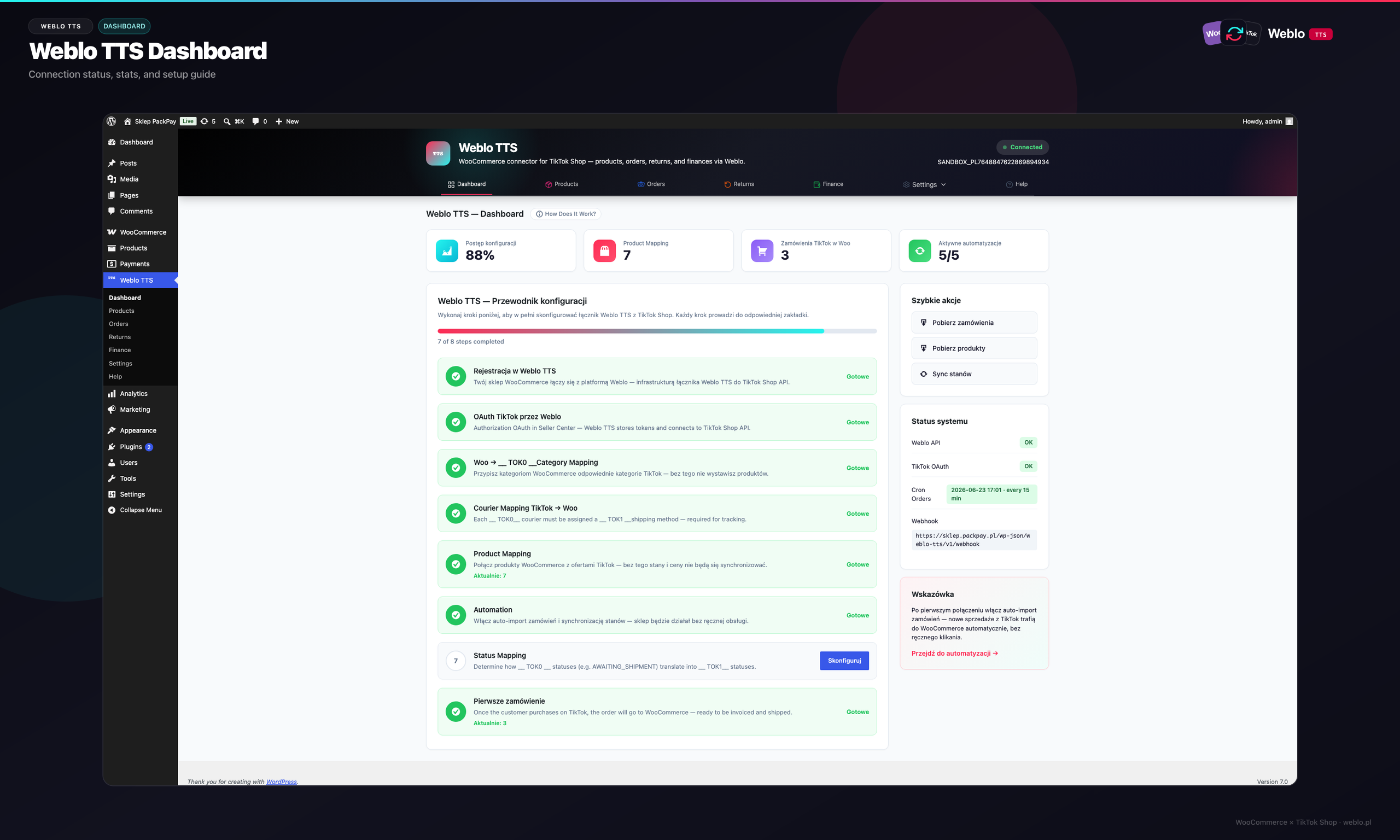
15.1 Weblo TTS Dashboard
The home screen after logging into WordPress. Shows setup progress (checklist), TikTok Shop connection status, shortcuts to products and orders, and a summary of the latest synchronisation.
- Connection section - whether TikTok OAuth is active (green “Connected” status).
- Setup guide widget - next steps: store registration, OAuth, mapping, first product push.
- Stat tiles - paired product count, TikTok orders, last sync time.
- Shortcuts to Products, Orders, and Settings tabs.
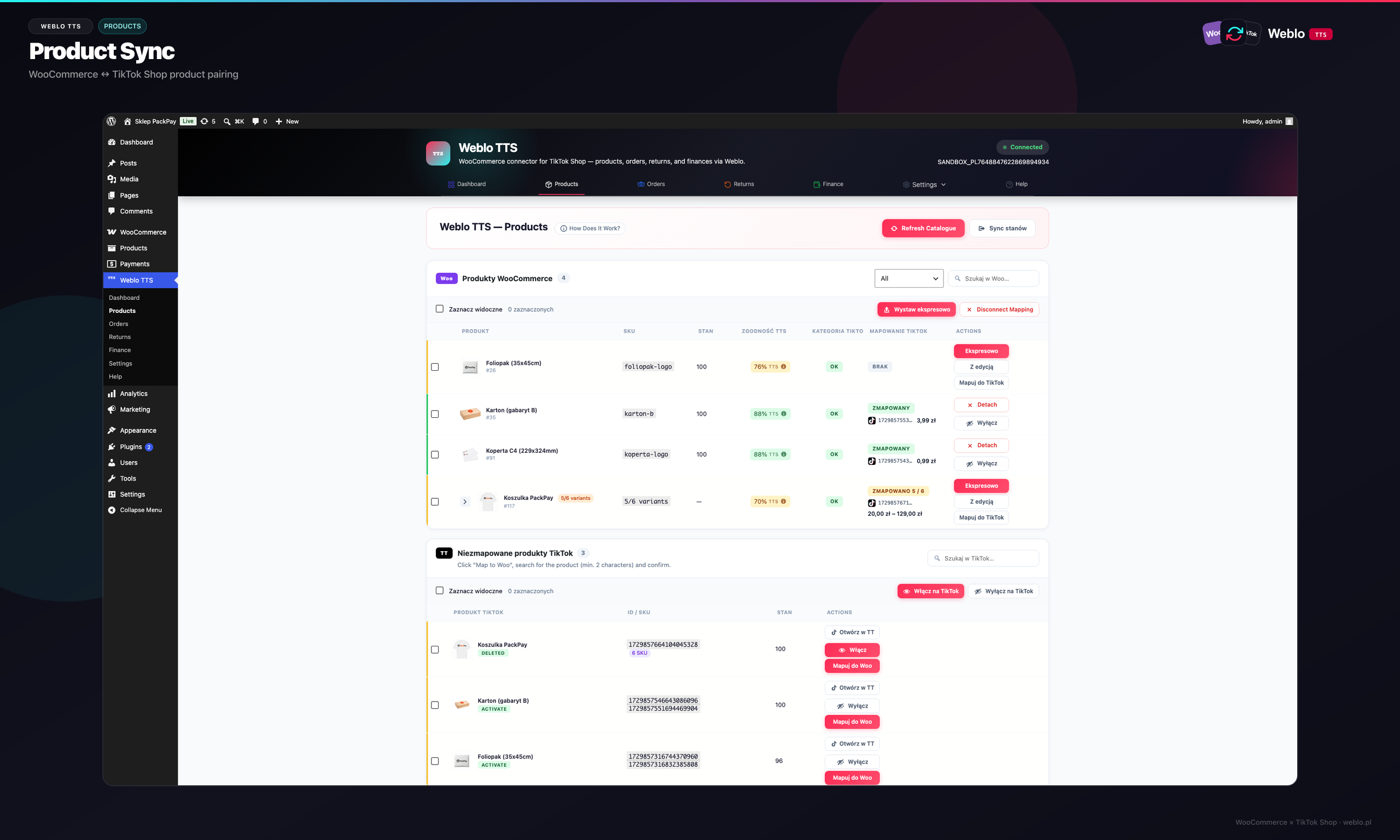
15.2 Product Synchronisation
The Products tab shows paired items: WooCommerce on the left (SKU, name, stock) and the matching TikTok listing on the right (ID, publish status). Merchants push new products or update existing listings from here.
- Push to TikTok / Pull from TikTok buttons - bulk catalog sync.
- Sync status column - synced, pending, or error (details in logs).
- Variant mapping (size, colour) to TikTok SKUs.
- Filters: unpaired only, errors only, active listings only.
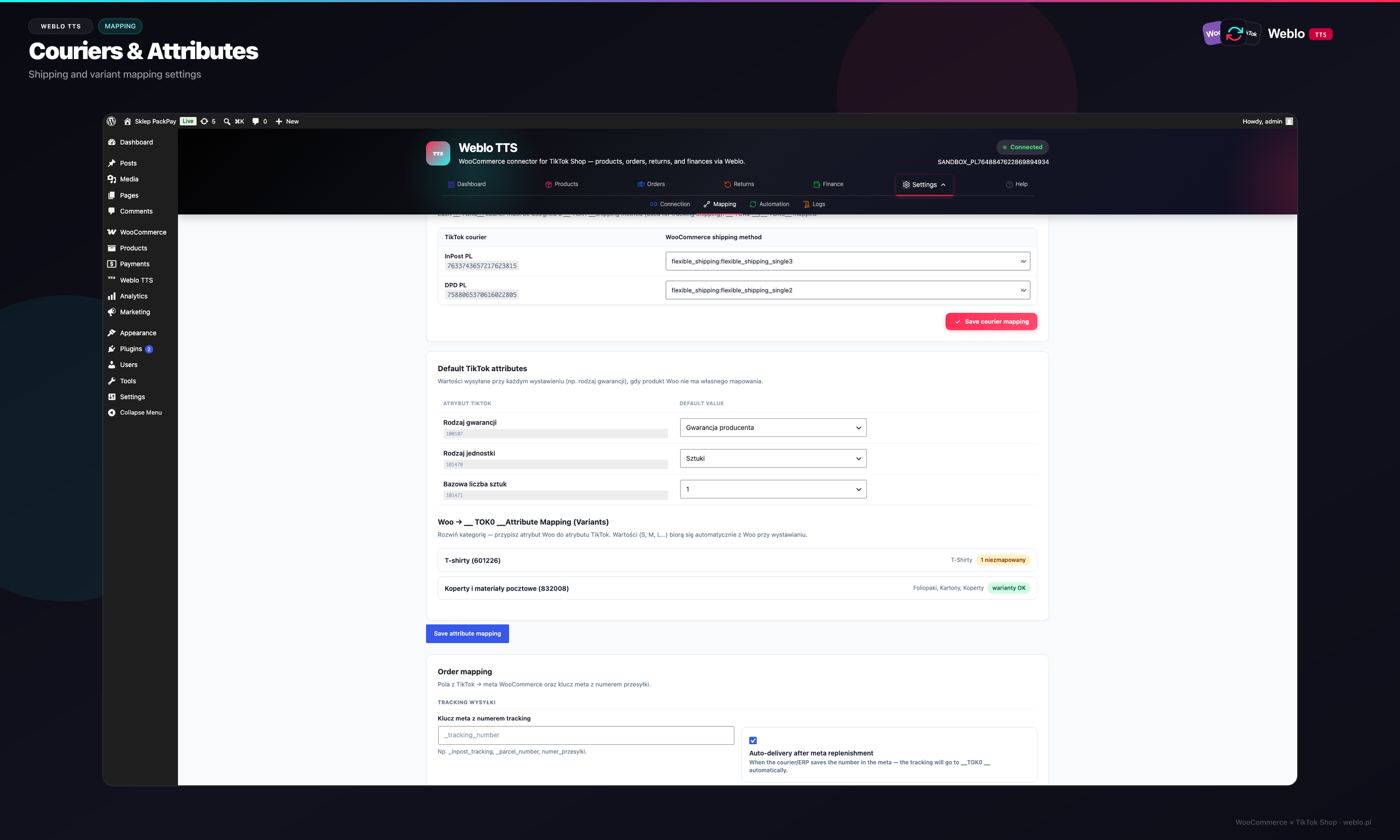
15.3 Category and Carrier Mapping
Settings → Mapping panel. Merchants assign WooCommerce categories to the TikTok category tree, map Woo shipping methods to TikTok carriers, and fill mandatory attributes required by the selected TikTok category.
- Category mapping - TikTok category search + assignment to Woo categories.
- Carrier mapping - WooCommerce shipping method → TikTok shipping provider ID.
- Product attributes - required TikTok fields before listing publish.
- Mappings saved and synced to Weblo API (
/mappings).
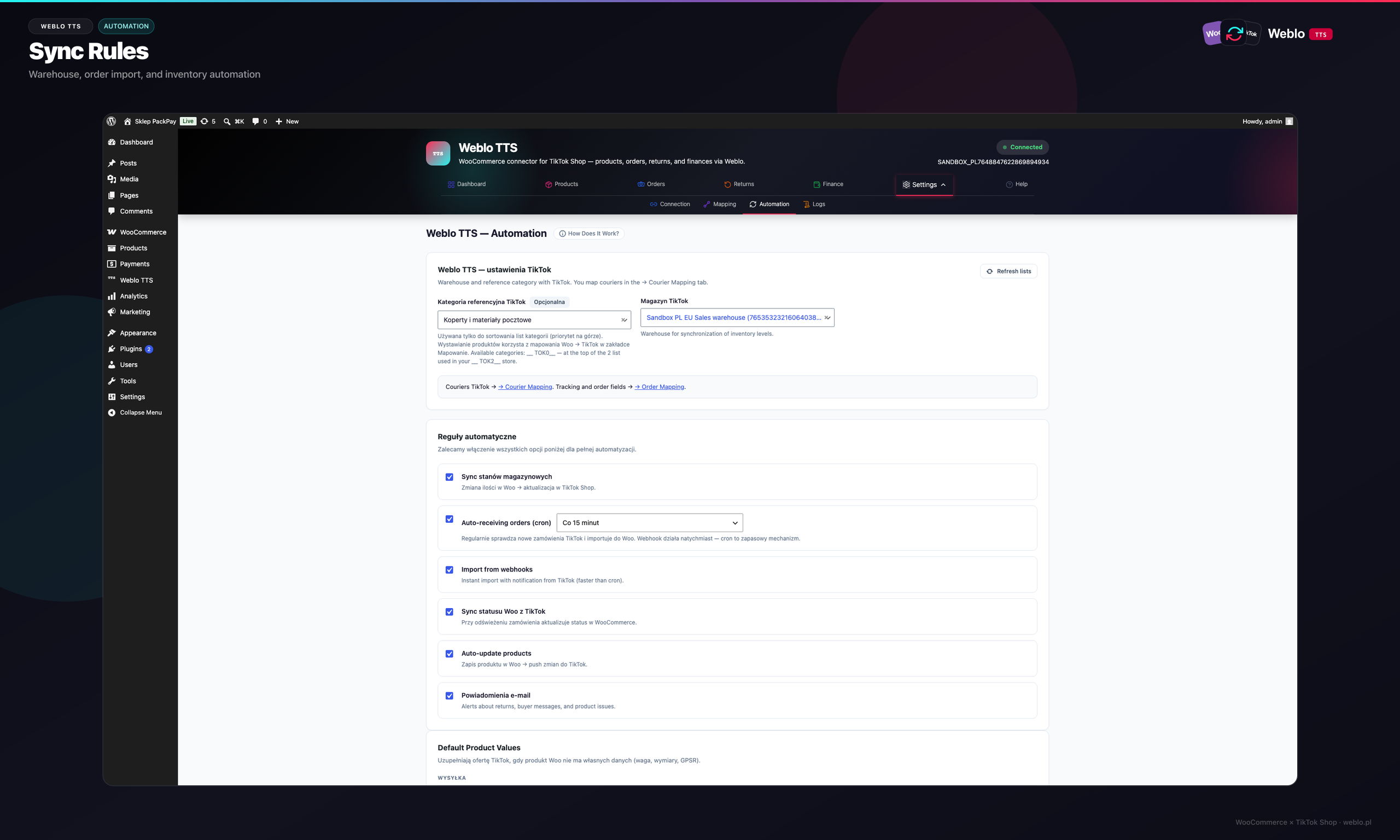
15.4 Automation Rules
Settings → Automation tab. Merchants define when Weblo TTS should automatically sync inventory on WooCommerce stock changes, import new TikTok orders (webhook + cron fallback), and update prices.
- Auto-sync inventory toggle - push inventory after every Woo stock change.
- Auto-import orders - create Woo order on
tiktok.orderwebhook. - Fallback cron interval - pull orders when webhooks fail.
- Sync logging options (audit trail in the Logs tab).
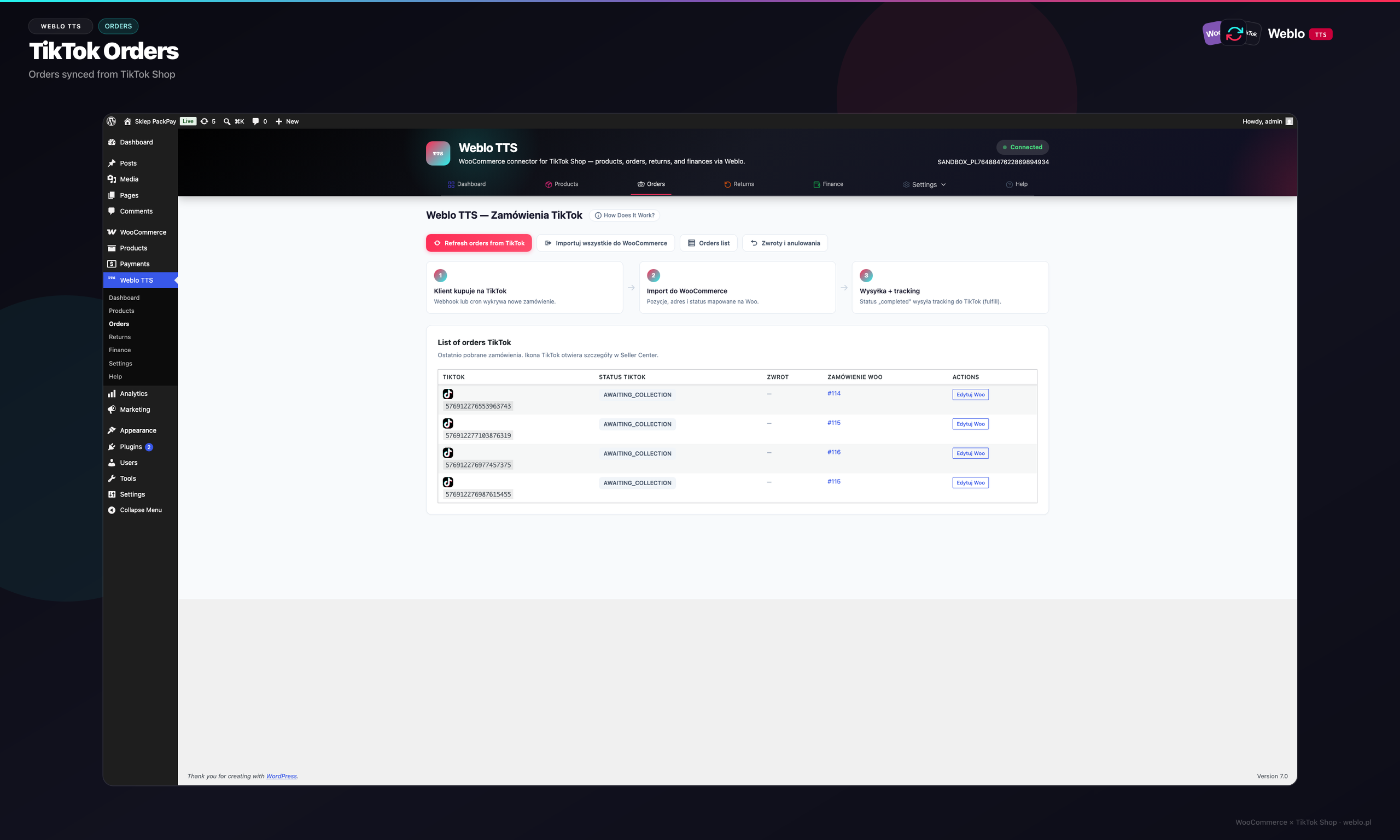
15.5 TikTok Orders
The Orders tab aggregates TikTok orders linked to WooCommerce. Merchants can manually refresh the list from TikTok, filter by import status, and open the Woo order for editing.
- Refresh orders from TikTok button - calls
POST /sync/orders/pull. - Columns: TikTok ID, Woo ID, status, amount, date, fulfillment status.
- Imported / Pending / Import error indicators.
- Link to native WooCommerce order (HPOS compatible).
15.6 TikTok Metabox on WooCommerce Order
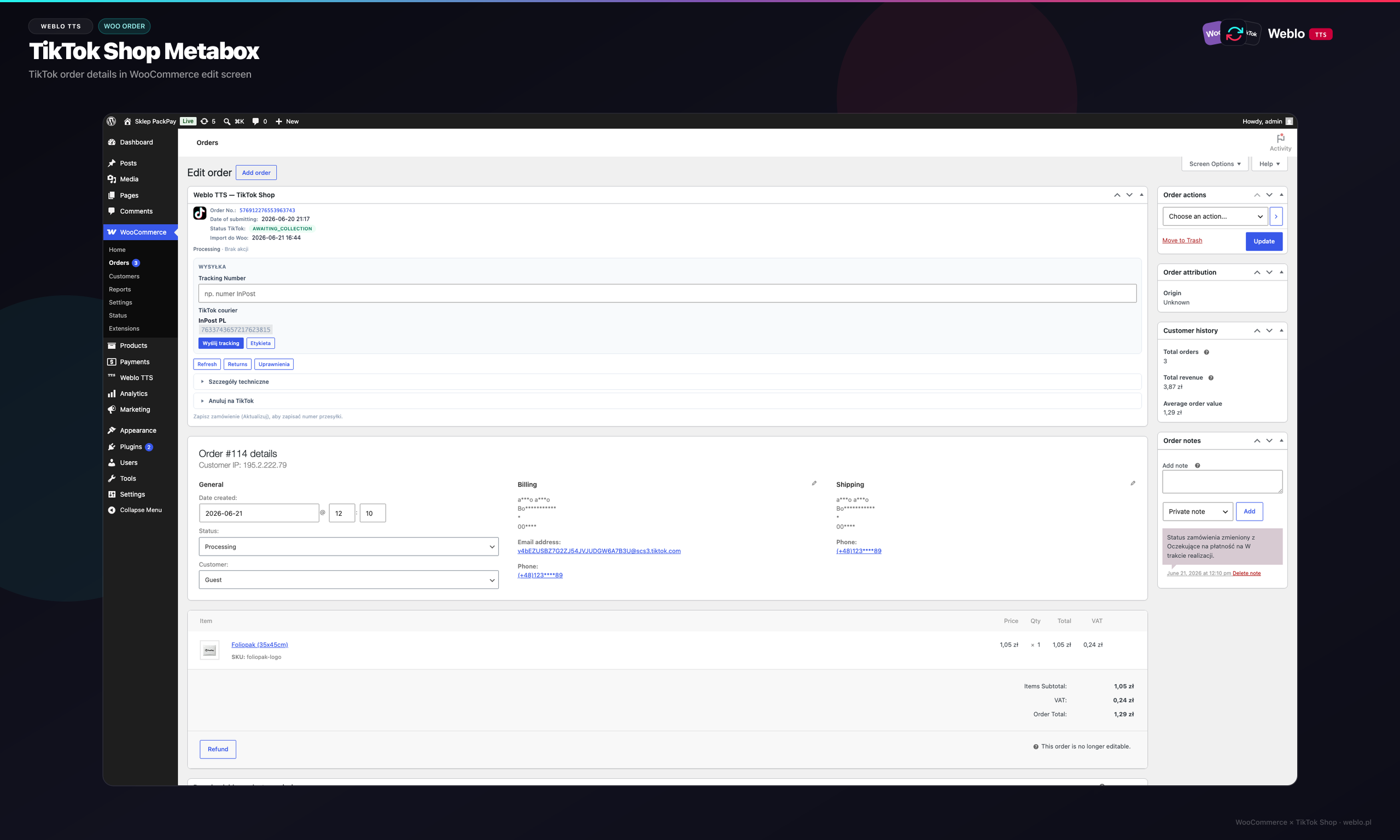
After a TikTok order is imported, the WooCommerce order edit screen shows a Weblo TTS metabox with TikTok identifiers, package status, fulfillment form (tracking + carrier), and a link to Seller Center.
- Read-only fields: TikTok Order ID, Package ID, Shop ID, region.
- Fulfillment form - tracking number + carrier from mapping.
- Send tracking to TikTok button →
POST /sync/orders/fulfill. - Sync history and last webhook for this order.
Document Approval
This document has been approved by the Management Board of TIME4IT Sp. z o.o.
Version: 1.0 · Approval date: 22 June 2026
Contact
For questions regarding this document, integration, or technical support:
TIME4IT Sp. z o.o.ul. Plonowa 24I/2, 05-500 Nowa Wola, Polska
KRS: 0001140137 · NIP: 1231569806 · REGON: 540441588
e-mail: [email protected]